
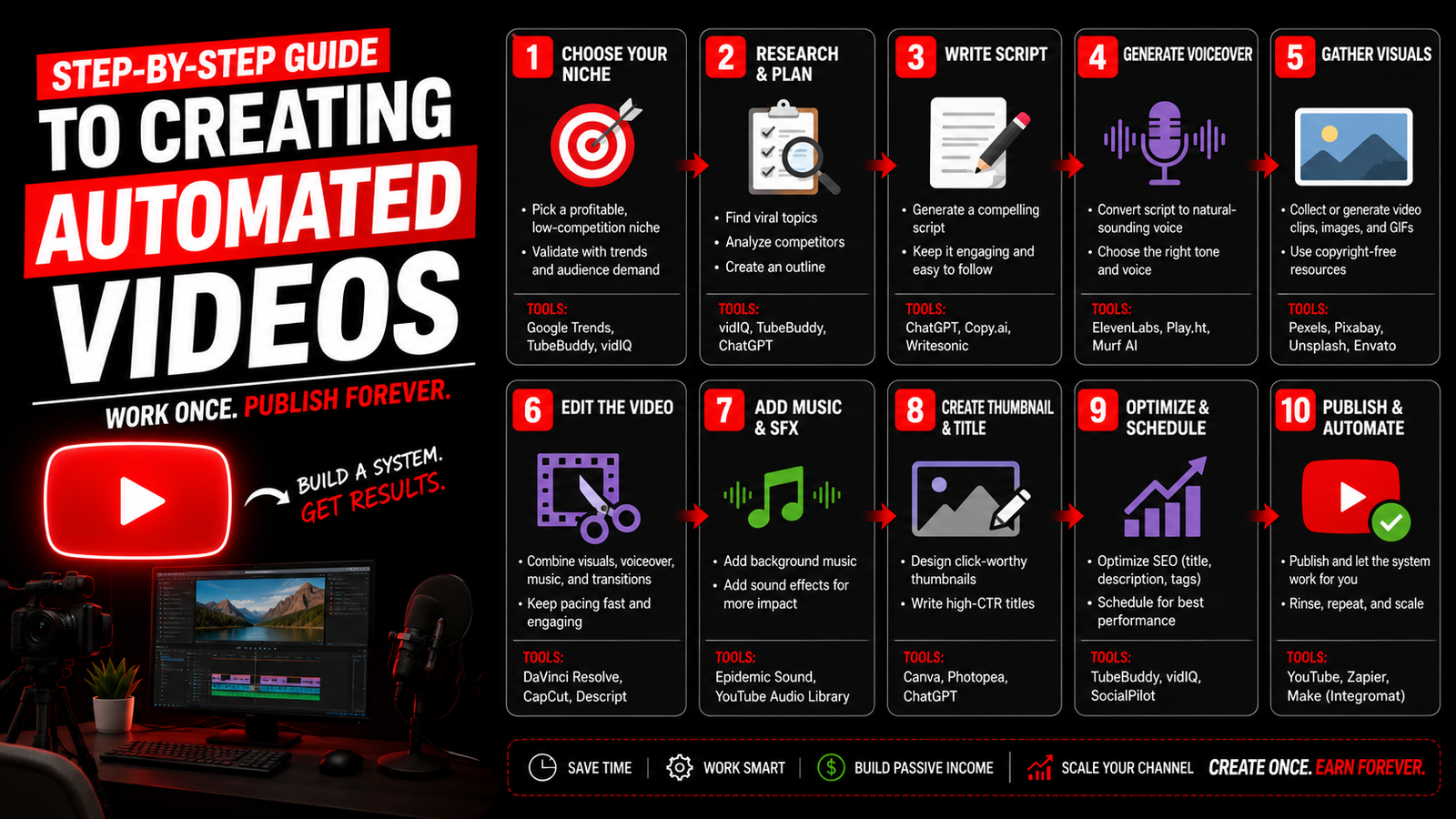
Introduction to Automated Videos
- Automated videos refer to the process by which video content is produced with minimal manual intervention, often utilizing software tools designed for efficiency and ease of use. In today’s digital landscape, where attention spans are short and the demand for high-quality content is incessant, automated videos have emerged as a significant asset for various sectors, including marketing, education, and social media engagement.
- The significance of automated videos lies in their ability to streamline the content creation process. By harnessing technology, professionals can create engaging visual narratives quickly and effectively. This capability is particularly beneficial for marketers who aim to increase their outreach and audience engagement across platforms like YouTube. Automated videos can be tailored for specific demographics, enhancing resonance with viewers and potentially boosting conversion rates.
- In the realm of education, automated videos play a crucial role in facilitating learning. Educators can develop instructional content that caters to diverse learning styles, enabling students to grasp concepts at their own pace. Platforms offering automated video solutions empower teachers to create detailed tutorials, enriching the classroom experience.
- Social media has also seen a surge in the use of automated videos, with brands frequently employing them to foster engagement. The shareable nature of video content enhances its visibility, making automated videos an effective tool for driving traffic to websites and increasing follower counts. Furthermore, these videos can improve overall user experience, as they typically feature concise, digestible segments catering to the audience's preferences.
- The benefits of utilizing automation in video creation are manifold, encompassing cost-effectiveness, consistency in quality, and the ability to refresh content easily. By understanding the profound impact of automated videos, organizations can harness their full potential to achieve their strategic goals efficiently.
Understanding Video Automation Tools
- Video automation tools have become indispensable for content creators and marketers seeking to produce engaging multimedia content efficiently. These tools vary in features, functionalities, and ease of use, catering to diverse needs in video production.
- One popular option for creating automated videos is Animoto. This tool allows users to transform photos and video clips into professional-quality videos with ease. Its drag-and-drop interface is particularly user-friendly, enabling both novices and experienced users to create visually appealing content. Animoto offers various templates tailored for different occasions, such as marketing promotions and personal events, making it versatile for any context.
- Another noteworthy tool is Lumen5, which is designed primarily for repurposing blog content into videos. Utilizing artificial intelligence, Lumen5 helps users generate video scripts based on text input and suggests relevant stock images and videos. This tool is especially beneficial for marketers looking to enhance their content on platforms like YouTube by attracting viewers with compelling video formats.
- When choosing the right video automation tool, several factors should be taken into account. First, consider the specific needs of your project, such as the type of content you wish to create and your target audience. Ease of use is also crucial; tools with intuitive interfaces will reduce the learning curve, allowing for quicker production. Additionally, assess the library of media assets provided by the tool, as access to high-quality visuals can significantly enhance the final output.
- Ultimately, selecting the right video automation software will depend on your individual objectives, level of expertise, and desired features. By exploring the options available, such as Animoto and Lumen5, you can find a tool that aligns perfectly with your content creation goals.
Planning Your Automated Video Content
- Before embarking on the journey of creating automated videos, it is essential to engage in thorough planning. This phase not only shapes the direction of your content but also ensures that the final product resonates with the intended audience. The first step in this preparatory stage is to identify your target audience. Understanding who will view your video is crucial as it influences the tone, language, and content you decide to include.
- Next, solidifying the message or theme of your video is paramount. Decide what you aim to convey, whether it be educational, promotional, or entertaining. A clear theme acts as a foundation for all subsequent decisions, enabling you to maintain coherence throughout the video. Once you've established your audience and theme, creating a script or storyboard becomes necessary. A well-structured script outlines the key points and ensures that your message is communicated effectively. Similarly, a storyboard allows you to visualize each scene, facilitating a smoother production process later on.
- Furthermore, gathering necessary assets is a critical part of the planning process. This includes sourcing appropriate images, music, and any other multimedia elements you wish to incorporate. Ensuring that you have high-quality, relevant assets will significantly enhance the appeal of your automated video. Platforms like YouTube often emphasize the importance of visual and auditory elements, and addressing these in your planning phase is essential for creating a polished final product.
- In conclusion, the planning stage of creating automated videos cannot be overstated. By defining your audience, establishing a clear message and script, and gathering vital assets, you lay the groundwork for successful video content that engages viewers on platforms like YouTube and beyond.
Creating Your First Automated Video
- Creating an automated video can seem daunting at first, but by following these clear steps, you can effectively utilize various tools to produce engaging content for platforms like YouTube. The first step in this process is selecting the right template that aligns with the theme of your video. Many video creation tools offer a variety of professionally designed templates that serve as a foundation for your project.
- Once you have chosen a template, the next action involves adding text to your automated video. This could be titles, subtitles, or descriptive text that supports the visual content. Ensure that the font size, style, and color are easily readable, as this is crucial for viewer engagement, especially if the video is shared on platforms similar to YouTube.
- After integrating text, it’s time to upload relevant images or video clips that complement your message. Choose high-quality visuals that not only enhance the viewer's experience but also relate directly to the content being presented. Properly integrating these elements makes your automated video more dynamic and appealing.
- Moreover, adding audio to your video can significantly improve its impact. Whether you choose a background music track or opt for a voiceover, ensure that the audio complements the visuals and does not overpower the content. Most tools allow you to upload your own audio files or select from a library of royalty-free music designed for usage in projects like YouTube videos.
- Finally, review your automated video to make sure all elements—template design, text, images, video clips, and audio—work harmoniously. Once satisfied with the overall product, you can export and share your creation on your desired platforms, including YouTube, increasing your reach and audience engagement.
Enhancing Video Quality with Customization
- Customization options play a crucial role in enhancing the quality and viewer engagement of automated videos on platforms such as YouTube. By investing time in these adjustments, creators can better align their video aesthetics with their branding and outreach objectives.
- One of the key elements of customization that can significantly affect video quality is the use of colors. Selecting a color palette that reflects your brand identity can make your content more recognizable and appealing. Tools for automated video creation often allow you to modify the primary colors featured in your clips. Ensure that you opt for colors that not only resonate with your brand but also enhance legibility to maintain viewer interest.
- Fonts are another essential aspect. The typeface you choose sets the tone of your automated video, impacting the overall viewer experience. It is advisable to choose clean, easy-to-read fonts for informative sections while being more creative with titles and calls to action. Be mindful of font sizes and styles, ensuring they are visually consistent across all videos to strengthen brand recognition on platforms like YouTube.
- Additionally, paying attention to transitions and animations significantly impacts video flow. Smooth transitions can keep viewers engaged, while clever animations can emphasize key points without overwhelming the viewer. Automated video creation tools usually provide various options for adding transitions between scenes and animations to text or images, making it vital for creators to explore these features to find what best suits their brand's style.
- In summary, enhancing video quality through extensive customization options can lead to more engaging automated videos. By carefully selecting colors, fonts, transitions, and animations, creators can ensure that their videos not only capture attention but also effectively communicate their brand message.
Adding Voiceovers and Sound Effects
- In the realm of automated videos, audio plays a pivotal role in creating an engaging and immersive experience for viewers. The careful integration of voiceovers, background music, and sound effects can significantly elevate the quality of your content. This section will guide you through the essential steps required to add these audio components effectively.
- To begin with, adding voiceovers to your automated videos is a crucial process. A well-delivered voiceover helps convey the message clearly, enhancing viewer comprehension and engagement. Start by selecting a voice that resonates with your video's theme and audience. Record your script in a quiet environment, ensuring clarity and appropriate pacing. There are various software options available, such as Audacity or Adobe Audition, that allow for easy editing and enhancement of your audio files. Once your recording is complete, integrate it into your video editing software, synchronizing it with the visual elements for a seamless flow.
- Next, the choice of background music should complement the voiceover and set the overall tone of the video. Selecting the right track is crucial – it should not overpower the voiceover but rather enhance the narrative. Websites offering royalty-free music, such as Epidemic Sound or Artlist, can be valuable resources for sourcing suitable background scores. Adjust the audio levels accordingly to maintain balance throughout the video.
- Finally, incorporating sound effects can add depth and excitement to your automated videos. These effects can punctuate moments within your narrative, fostering a more dynamic viewing experience. Decide where to place sound effects thoughtfully to avoid overwhelming the audience. Various audio libraries are available, offering a wide range of effects that you can use to enhance your content.
- By effectively adding voiceovers, background music, and sound effects, you can transform your automated videos into captivating experiences for your audience.
Exporting and Sharing Your Video
- Once the automated video has been created, the next crucial step is exporting it in a suitable format. The choice of format can significantly affect the video quality and compatibility with various platforms. Common video formats include MP4, AVI, and MOV, with MP4 being the most widely supported. This format provides a good balance between quality and file size, making it ideal for sharing on platforms like YouTube.
- To export your video, you will typically navigate to the export or render section of your video editing software. Here, you can choose the desired format and set parameters such as resolution and bitrate. When exporting for YouTube, it is advisable to select a resolution of at least 1080p for high-definition quality, as this meets the platform's standards for optimal viewing experiences.
- After exporting, sharing your video effectively is essential to reach your audience. For platforms like YouTube, ensure to create an engaging title, a descriptive caption, and relevant tags to enhance discoverability. Additionally, creating attractive thumbnails can increase click-through rates, promoting more views for your video.
- For social media sharing, consider the specific requirements of each platform. For instance, videos often perform better on Facebook when kept under one minute, while Instagram supports short clips that capture attention quickly. Adjust the video's length and format according to the platform's norms, maximizing engagement across channels.
- Lastly, uploading videos to your website can also be beneficial. Embedding your video directly on your site not only enhances content richness but also improves user retention. Ensure that your website is optimized to handle video content efficiently to provide visitors with a seamless viewing experience.
Analyzing Video Performance
- In the realm of automated video creation, analyzing performance is crucial to ensuring the success of your content on platforms like YouTube. By understanding how your videos perform, you can make informed decisions that enhance viewer engagement and increase reach. Key performance metrics such as watch time, viewer retention, and click-through rates serve as indicators of your video’s effectiveness. These metrics highlight how well your content resonates with your audience and guide your strategy moving forward.
- To monitor these vital statistics, various tools are available. YouTube Analytics, for instance, provides detailed insights into video performance, allowing creators to see how their content is received over time. This includes data on demographics, traffic sources, and even real-time performance of uploaded videos. Other tools like Google Analytics can also be integrated with YouTube to offer a more comprehensive analysis of how viewers interact with your videos across the web.
- By leveraging insights gained from video performance analysis, creators can make necessary adjustments to future projects. For example, if analytics reveal that a certain type of video format garners more views or higher retention rates, this information can guide the type of content to produce next. Additionally, understanding how audience engagement varies around different content allows for tailoring future automated videos to meet viewer preferences more effectively, thereby increasing the potential for success on the platform.
- In conclusion, a methodical approach to analyzing video performance is essential for creators looking to optimize their automated video projects on YouTube. By tracking performance metrics and utilizing analytics tools, it is possible to enhance future content strategy significantly.
Best Practices for Future Automated Video Projects
- Automated video projects on platforms like YouTube require a strategic approach to ensure efficiency and effectiveness. As technology evolves, best practices must be adopted for ongoing success in the realm of automated video creation. One primary consideration is staying updated with the latest trends in video content. By monitoring popular styles, themes, and formats on platforms such as YouTube, creators can align their automated videos with audience expectations, enhancing viewer engagement.
- Continuous learning is another crucial practice for effective video automation. Engaging with industry resources, attending webinars, and participating in online forums can provide valuable insights into the latest tools and techniques for video production. Furthermore, understanding emerging technologies, such as AI-driven editing software and analytics platforms, can significantly streamline the creation and distribution processes. Adapting these advancements into your video strategies can elevate the quality and reach of your content.
- Being flexible and open to change is vital when developing automated video content. Audience preferences and platform algorithms can shift, requiring content creators to frequently reassess and modify their strategies. Utilizing data from previous videos can aid in determining what performs well and what does not. Regular performance assessments through viewing statistics and engagement metrics on YouTube will guide necessary adjustments, ensuring the content remains relevant and compelling.
- In conclusion, by focusing on trends, committing to continuous learning, and maintaining adaptability in automated video projects, creators can optimize their content effectively. These best practices will not only enhance the creation process but also improve the overall viewer experience, leading to sustained interest and engagement in automated videos over time.
Login or create account to leave comments

Comments (0)